Vertex Color AO in Shaders
The AO baker writes ambient occlusion into a vertex color channel of your choice. For that AO to actually show up, your shader needs to read that channel and apply it to the lighting.
Many foliage rendering solutions, such as TVE, support vertex color AO out of the box — you just point them at the right channel. For a custom shader, it's easy to add.
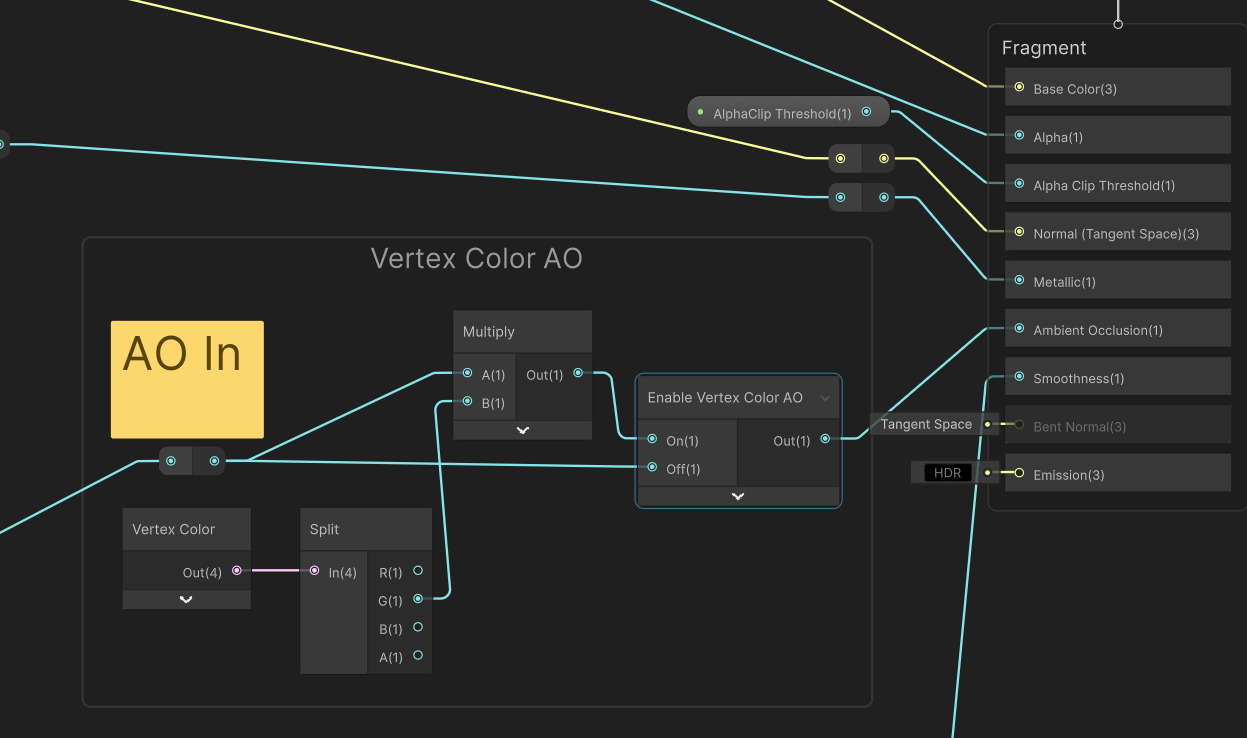
In ShaderGraph
- Add a Vertex Color node.
- Take the channel you baked into (e.g. the G output if you baked into Green).
- Multiply it into your Base Color (and/or feed it to the Ambient Occlusion block in URP/HDRP Lit graphs).
Tip
Use the channel selector in the AO baker and your shader consistently. If you baked AO into Green, make sure the shader multiplies by the Green vertex color channel — not the full RGB color.
Previewing the Bake
You don't need to set up a shader just to check your bake. The Foliage Renormalizer component includes a built-in Debug Render Vertex Color preview that visualizes any channel directly in the Scene view. See Debug Tools.